AMSA
Week 12: AWS Networking, EC2, ECS and ECR
Goals for today
- Understand what are cloud providers.
- Understand AWS Networking (at a concept level)
- Understand the concepts behind: EC2, ECR and ECS
Recap
- Remember the differences between VM’s and Containers.
- What we’ve done on PRAC-4.1 and PRAC-4.2?
Running Locally on your own network
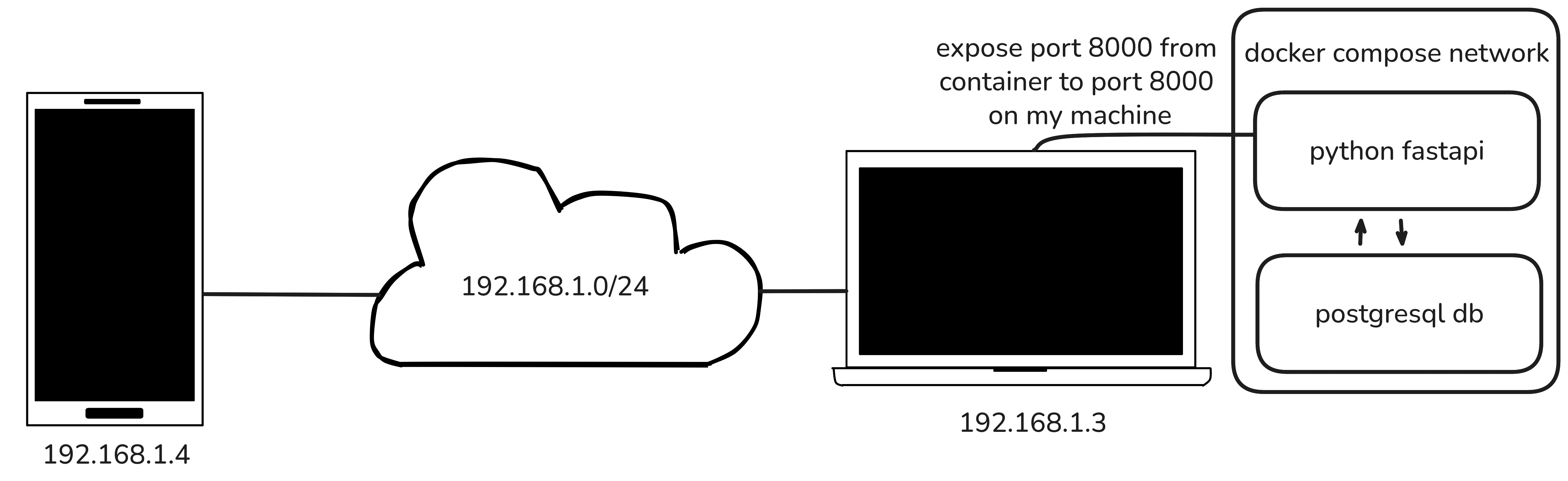
Exposing it to the internet
Take into account this example 1

What could be wrong?
- We expose our home network (or at least one service running on it)
- We are responsible for all aspects of the setup, including electricity, network connectivity, device updates, and more.
- We can’t poweroff our computer.
The Cloud
Cloud providers.
There are quite a few:
- AWS
- Gcloud
- Azure
- Etc.
AWS
We’ll be using AWS, because we’ve access to aws academy.

Networking
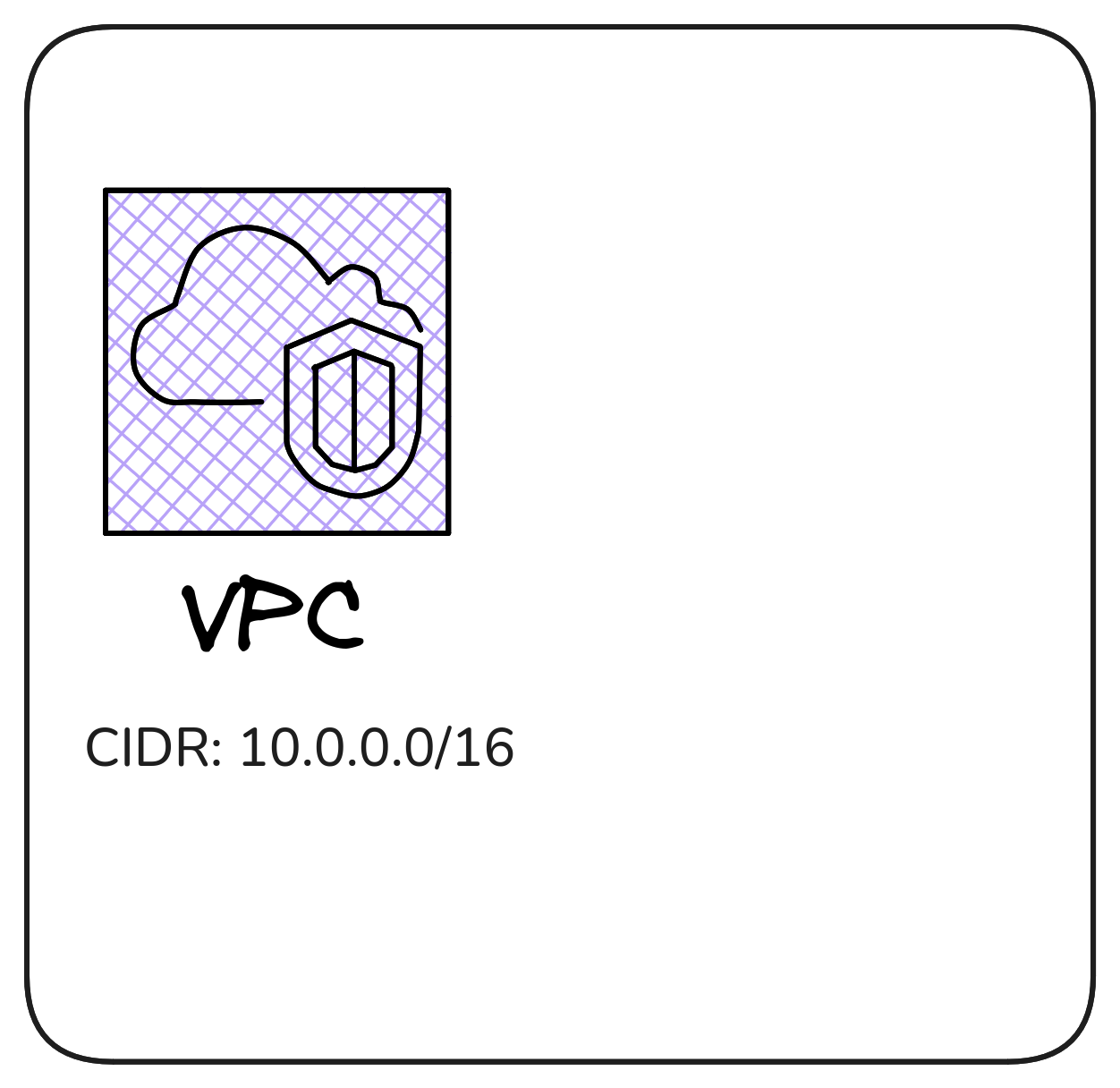
VPC (Virtual Private Cloud)
IP Addressing in Amazon Virtual Private Cloud (VPC) refers to the assignment of IP addresses to the resources within a VPC.
VPC is Amazon Web Services (AWS) solution for providing isolated network environments for AWS resources. IP addresses in a VPC are used for communication between resources within the VPC, as well as for communication between the VPC and the Internet.
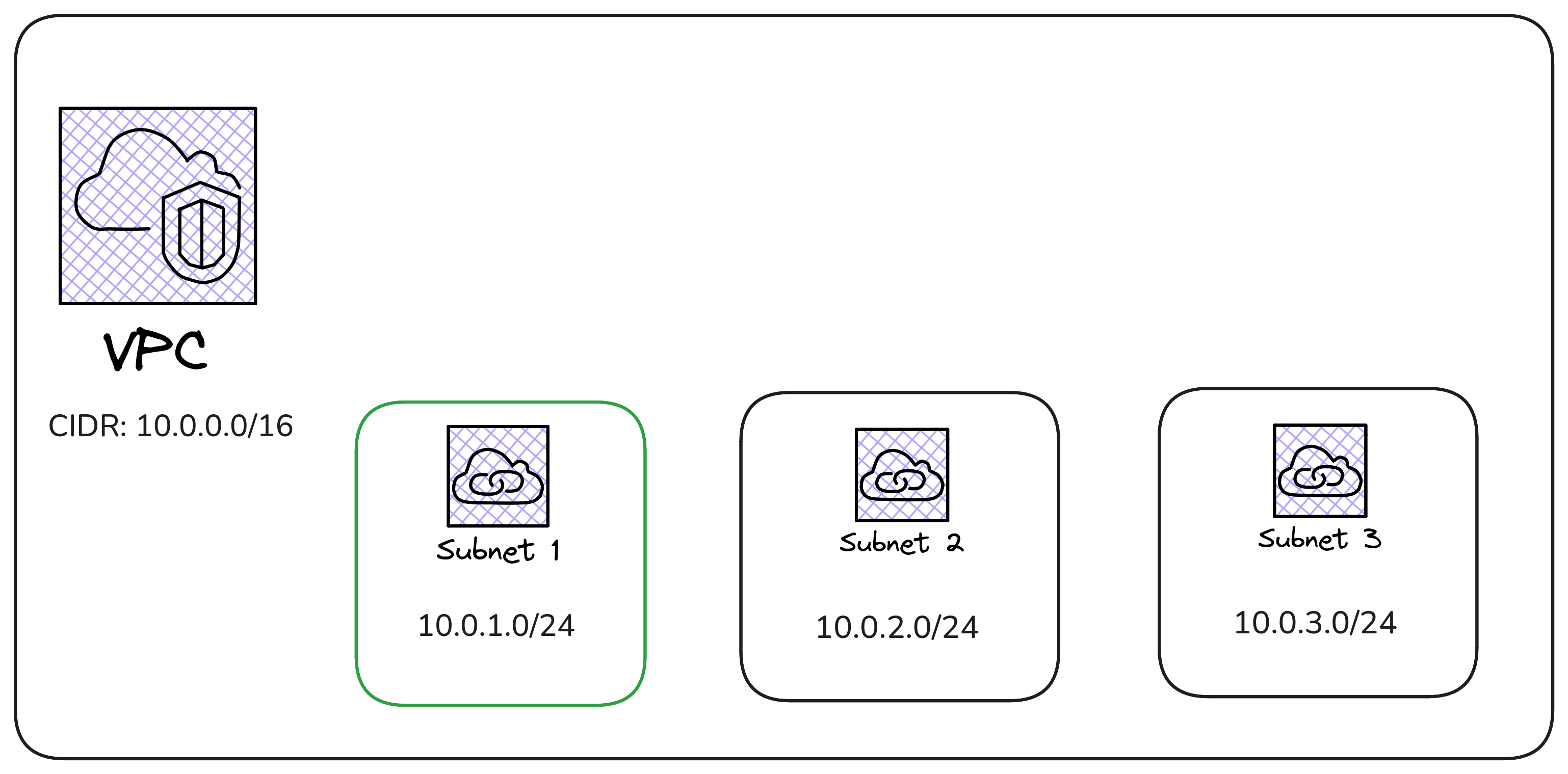
Subnets
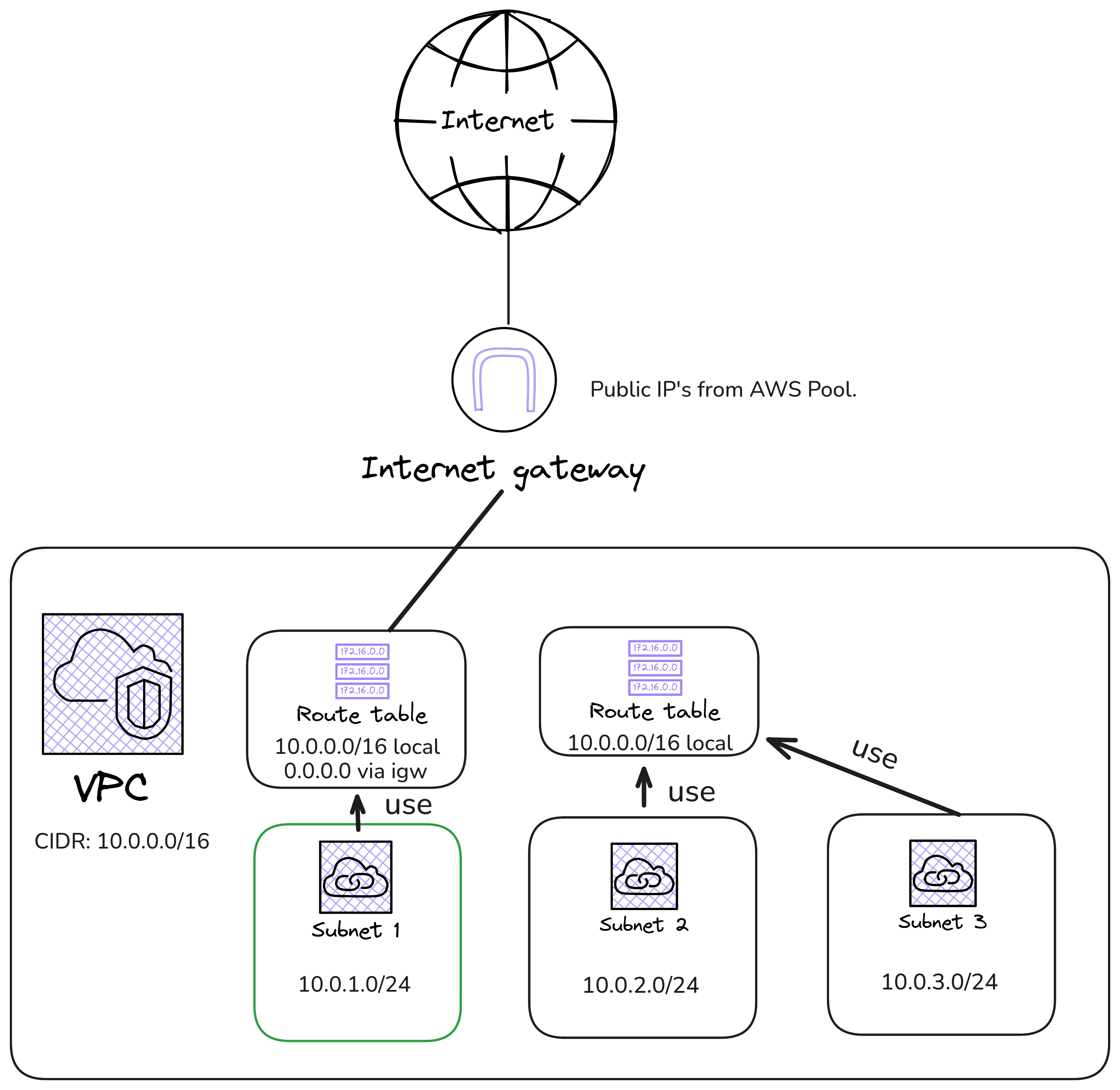
- We want to have networks given a VPC.
![]()
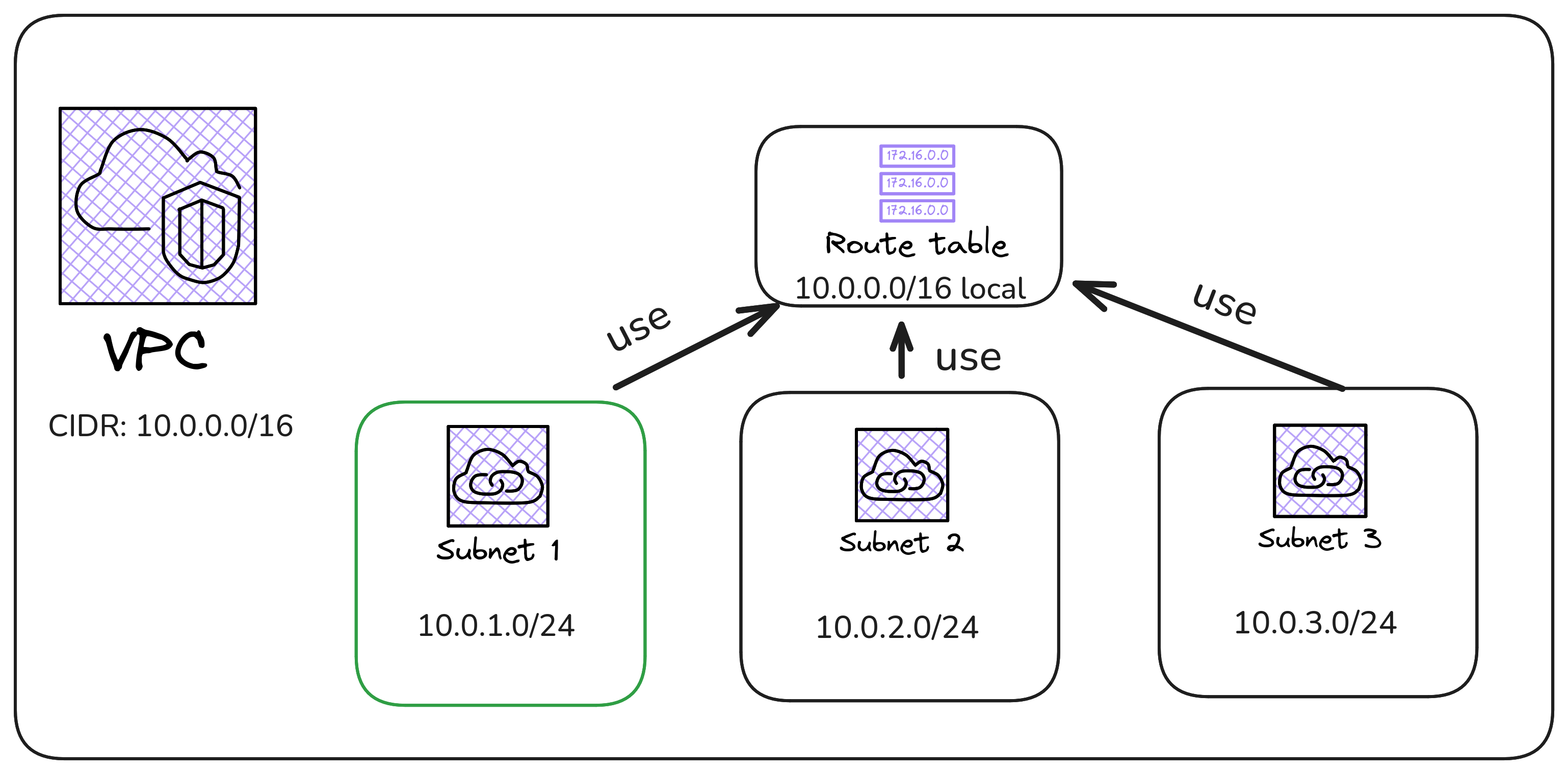
Routing Tables
- We want to communicate the subnets we created earlier.
Internet Gateway
- If we want a subnet to have access to the internet and/or have a public ip address, we have to connect it to the internet gateway
- We could also use a NAT Gateway (if we don’t need a public ip), but it’s out of the scope of this class.
EC2
- An EC2 instance is a virtual server in the AWS Cloud.
- Runs an instance of the VirtualMachine with the OS you select.
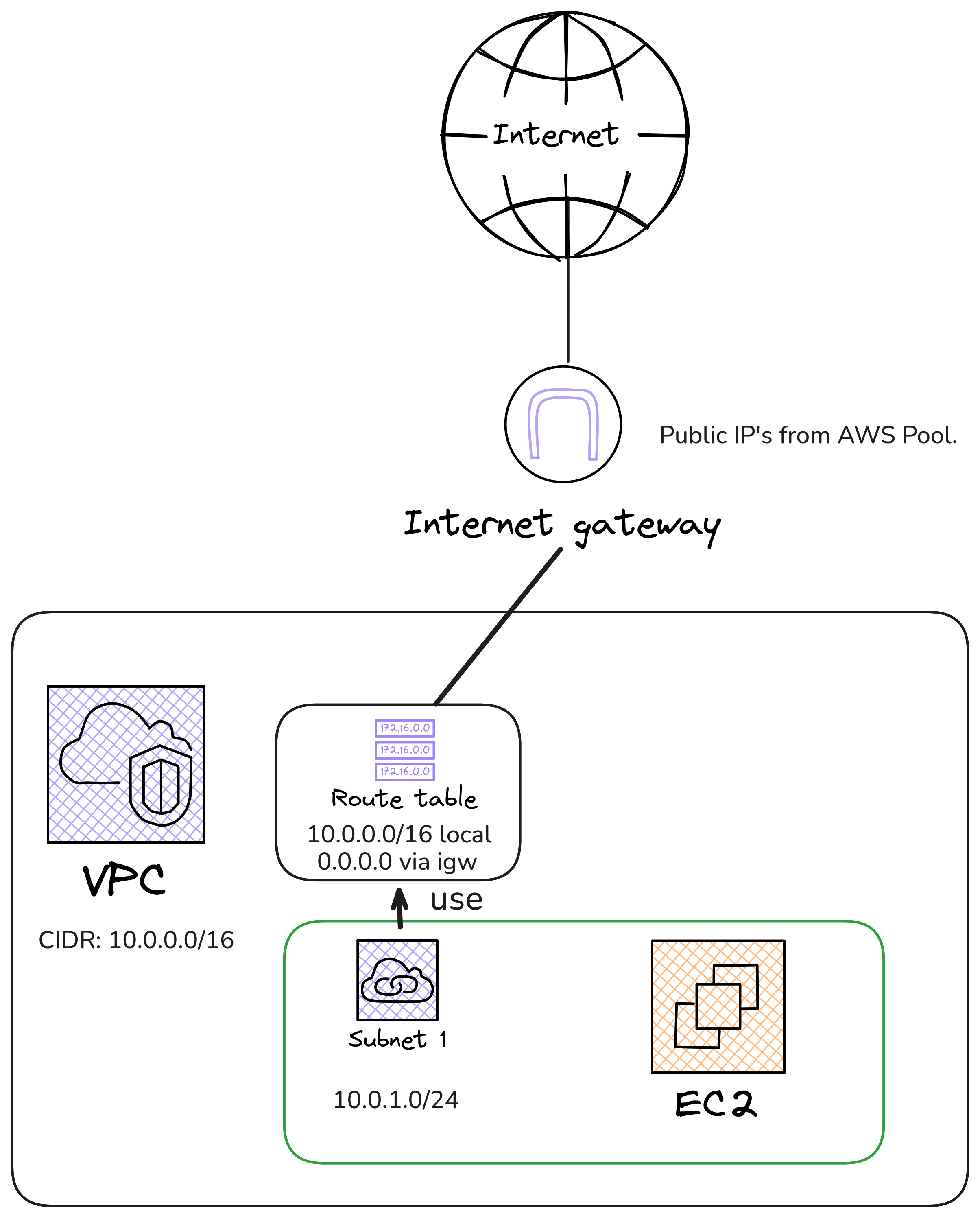
Example of EC-2 with our App
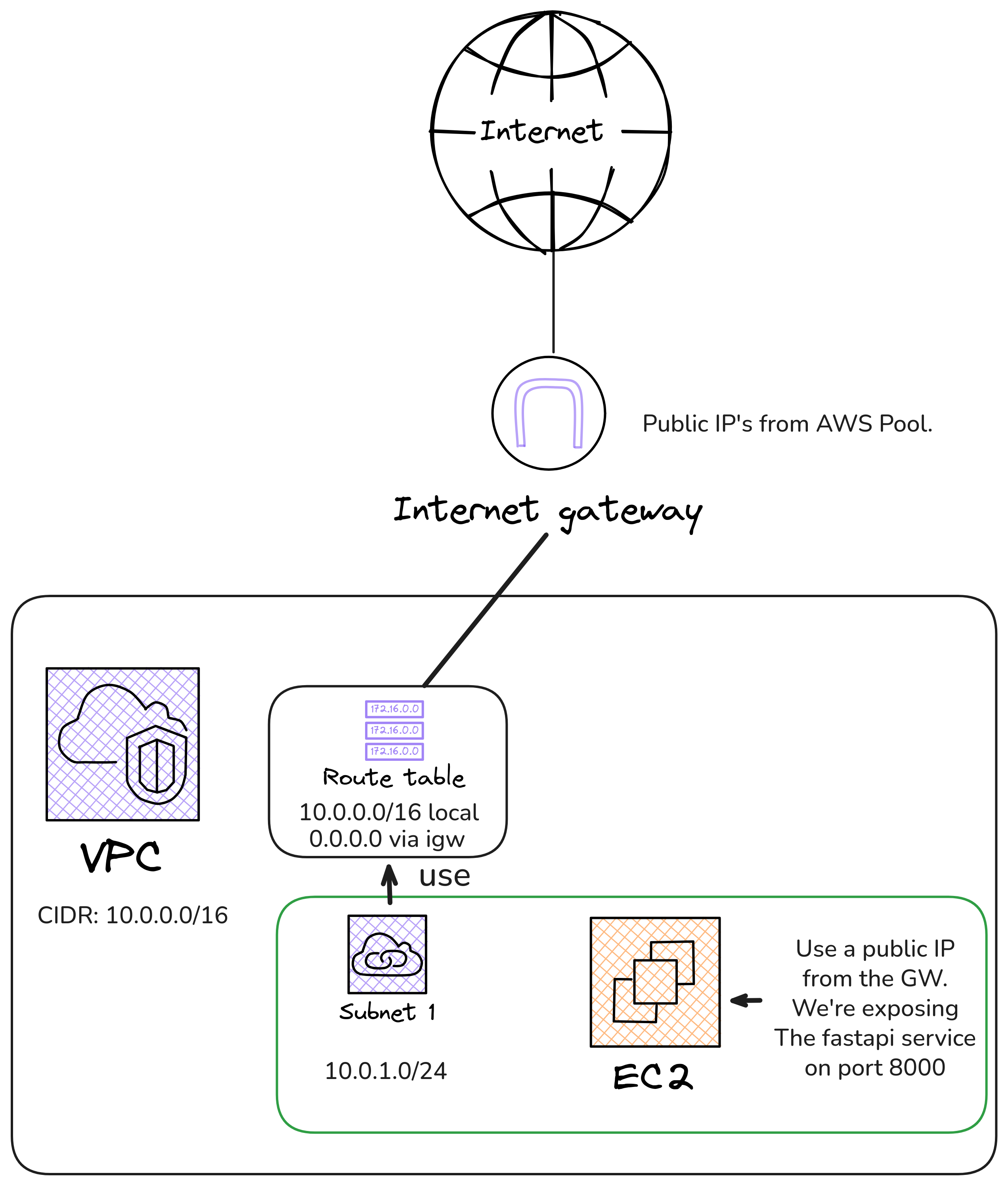
Benefits?
Good:
- We don’t expose our home network.
- Our laptop/PC doesn’t have to be powered on.
- Change the specs of the vm’s.
Bad:
- Doesn’t scale well
- Although our workload is only used on a per-request basis, AWS bills us as though the machine is running continuously for 24 hours.
- We’ve to manage the virtual machine (updates, etc.)
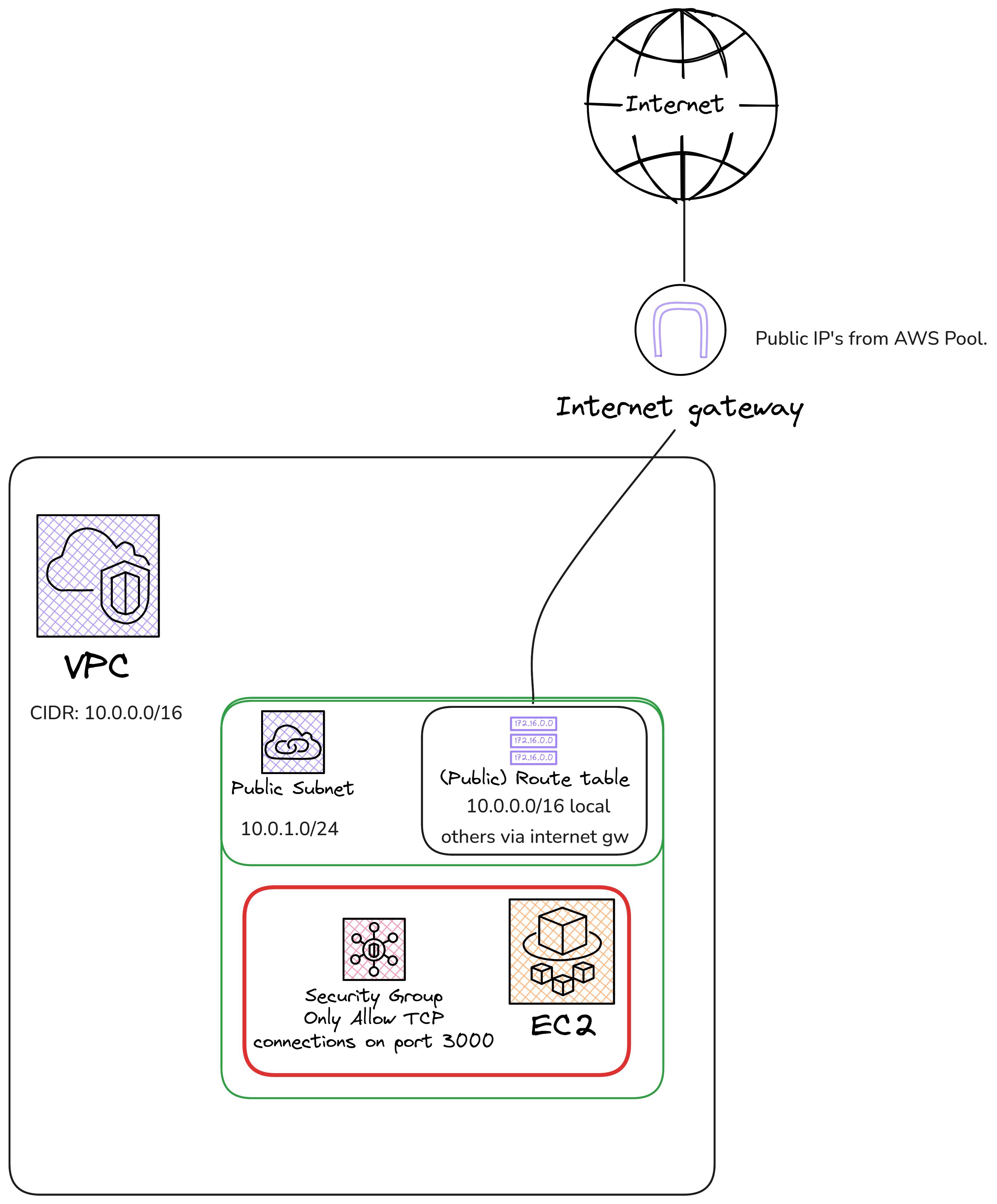
Security Groups
- A firewall for our services.
- Let’s put an example with EC-2
Example of a SG with EC-2
Serverless
Our app runs on a server/virtual machine that you don’t have to buy or manage.
You could (theoritecally) scale to zero.
ECS
- Container runs on machines you don’t really manage.
- Shares the same architecture with EC2, but it follows a different execution model: no OS layer is exposed. You simply run the defined workload.
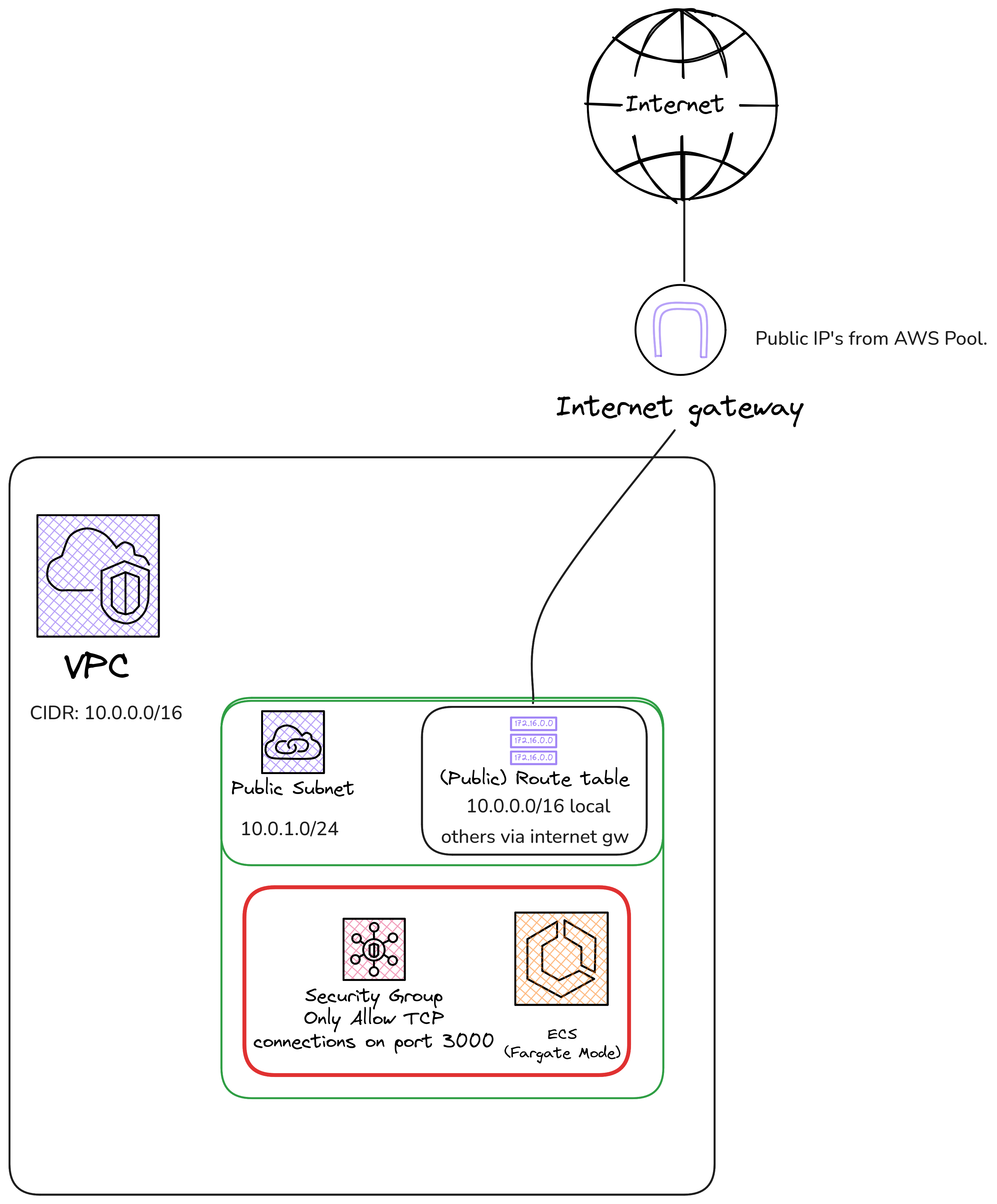
Benefits?
Good:
- We don’t expose our home network.
- Our laptop/PC doesn’t have to be powered on.
- Change the specs of the vm’s.
- We don’t have to manage the VM updates, security, etc.
Bad:
- Doesn’t scale to zero…. It’s a known issue… 1
ECR
- We need to upload our container image to a registry, so we can tell ECS to start an instance of this image.
- Allows us to create a public registry or a private one.
Other Services
- Lambda: Similar to ECS but in the code level, not container level.
- AppRunner: Easier than ECS (isn’t included on AWS academy…)
- EKS: Kubernetes on AWS.
- Etc.
IAM
IAM means: Identity and Access Management.
Why IAM?
- I may have multiple users/services on my AWS project, so I want to have permissions for each one.
- When you first create an AWS account, you begin with one sign-in identity that has complete access to all AWS services and resources in the account. This identity is called the AWS account root user.
Users
- IAM User: this is a “real” identity in AWS associated with a specific person (or application) inside a single AWS account.
- An IAM User has long-term credentials (like a password and/or access keys) that don’t expire
IAM Roles
Roles are very useful for:
Granting temporary or time-limited access.
Letting external identities or different AWS accounts access resources
Letting AWS services (like EC2, Lambda, etc.) act on your behalf without embedding permanent credentials
Policies
Policies assigned to a Role or User, tells us the capabilties it has:
$ aws iam get-account-authorization-details --no-cli-pager ... { "Path": "/", "RoleName": "LabRole", "RoleId": "AROAVRUVSF2D77Y24LJWD", "Arn": "arn:aws:iam::381492014727:role/LabRole", "CreateDate": "2025-12-01T09:02:47+00:00", "AssumeRolePolicyDocument": { "Version": "2012-10-17", "Statement": [ { "Effect": "Allow", "Principal": { "AWS": "arn:aws:iam::381492014727:role/LabRole", "Service": [ "elasticloadbalancing.amazonaws.com", "ec2.amazonaws.com", "iot.amazonaws.com", "elasticfilesystem.amazonaws.com", "lambda.amazonaws.com", "eks.amazonaws.com", "rekognition.amazonaws.com", "logs.amazonaws.com", "glue.amazonaws.com", "iotevents.amazonaws.com", "cloudtrail.amazonaws.com", "codecommit.amazonaws.com", "events.amazonaws.com", "servicecatalog.amazonaws.com", "elasticbeanstalk.amazonaws.com", "codewhisperer.amazonaws.com", "rds.amazonaws.com", "cloud9.amazonaws.com", "backup.amazonaws.com", "credentials.iot.amazonaws.com", "pipes.amazonaws.com", "ecs-tasks.amazonaws.com", "batch.amazonaws.com", "scheduler.amazonaws.com", "sagemaker.amazonaws.com", "autoscaling.amazonaws.com", "states.amazonaws.com", "apigateway.amazonaws.com", "elasticmapreduce.amazonaws.com", "ec2.application-autoscaling.amazonaws.com", "cognito-idp.amazonaws.com", "eks-fargate-pods.amazonaws.com", "resource-groups.amazonaws.com", "cloudformation.amazonaws.com", "deepracer.amazonaws.com", "forecast.amazonaws.com", "athena.amazonaws.com", "firehose.amazonaws.com", "secretsmanager.amazonaws.com", "codedeploy.amazonaws.com", "sqs.amazonaws.com", "redshift.amazonaws.com", "ecs.amazonaws.com", "dynamodb.amazonaws.com", "kinesisanalytics.amazonaws.com", "application-autoscaling.amazonaws.com", "ssm.amazonaws.com", "kms.amazonaws.com", "iotanalytics.amazonaws.com", "kinesis.amazonaws.com", "sns.amazonaws.com", "s3.amazonaws.com", "databrew.amazonaws.com" ] }, "Action": "sts:AssumeRole" } ] }, "InstanceProfileList": [ { "Path": "/", "InstanceProfileName": "LabInstanceProfile", "InstanceProfileId": "AIPAVRUVSF2D4J5LB7TUJ", "Arn": "arn:aws:iam::381492014727:instance-profile/LabInstanceProfile", "CreateDate": "2025-12-01T09:03:12+00:00", "Roles": [ { "Path": "/", "RoleName": "LabRole", "RoleId": "AROAVRUVSF2D77Y24LJWD", "Arn": "arn:aws:iam::381492014727:role/LabRole", "CreateDate": "2025-12-01T09:02:47+00:00", "AssumeRolePolicyDocument": { "Version": "2012-10-17", "Statement": [ { "Effect": "Allow", "Principal": { "AWS": "arn:aws:iam::381492014727:role/LabRole", "Service": [ "elasticloadbalancing.amazonaws.com", "ec2.amazonaws.com", "iot.amazonaws.com", "elasticfilesystem.amazonaws.com", "lambda.amazonaws.com", "eks.amazonaws.com", "rekognition.amazonaws.com", "logs.amazonaws.com", "glue.amazonaws.com", "iotevents.amazonaws.com", "cloudtrail.amazonaws.com", "codecommit.amazonaws.com", "events.amazonaws.com", "servicecatalog.amazonaws.com", "elasticbeanstalk.amazonaws.com", "codewhisperer.amazonaws.com", "rds.amazonaws.com", "cloud9.amazonaws.com", "backup.amazonaws.com", "credentials.iot.amazonaws.com", "pipes.amazonaws.com", "ecs-tasks.amazonaws.com", "batch.amazonaws.com", "scheduler.amazonaws.com", "sagemaker.amazonaws.com", "autoscaling.amazonaws.com", "states.amazonaws.com", "apigateway.amazonaws.com", "elasticmapreduce.amazonaws.com", "ec2.application-autoscaling.amazonaws.com", "cognito-idp.amazonaws.com", "eks-fargate-pods.amazonaws.com", "resource-groups.amazonaws.com", "cloudformation.amazonaws.com", "deepracer.amazonaws.com", "forecast.amazonaws.com", "athena.amazonaws.com", "firehose.amazonaws.com", "secretsmanager.amazonaws.com", "codedeploy.amazonaws.com", "sqs.amazonaws.com", "redshift.amazonaws.com", "ecs.amazonaws.com", "dynamodb.amazonaws.com", "kinesisanalytics.amazonaws.com", "application-autoscaling.amazonaws.com", "ssm.amazonaws.com", "kms.amazonaws.com", "iotanalytics.amazonaws.com", "kinesis.amazonaws.com", "sns.amazonaws.com", "s3.amazonaws.com", "databrew.amazonaws.com" ] }, "Action": "sts:AssumeRole" } ] } } ] } ], "RolePolicyList": [], "AttachedManagedPolicies": [ { "PolicyName": "c189452a4889395l12836487t1w381492014727-VocLabPolicy1-zEGBNp6Sfju0", "PolicyArn": "arn:aws:iam::381492014727:policy/c189452a4889395l12836487t1w381492014727-VocLabPolicy1-zEGBNp6Sfju0" }, { "PolicyName": "c189452a4889395l12836487t1w381492014727-VocLabPolicy2-egpPySJqgXEM", "PolicyArn": "arn:aws:iam::381492014727:policy/c189452a4889395l12836487t1w381492014727-VocLabPolicy2-egpPySJqgXEM" }, { "PolicyName": "c189452a4889395l12836487t1w381492014727-VocLabPolicy3-zGRYRYp1eJvu", "PolicyArn": "arn:aws:iam::381492014727:policy/c189452a4889395l12836487t1w381492014727-VocLabPolicy3-zGRYRYp1eJvu" }, { "PolicyName": "AmazonSSMManagedInstanceCore", "PolicyArn": "arn:aws:iam::aws:policy/AmazonSSMManagedInstanceCore" }, { "PolicyName": "AmazonEKSClusterPolicy", "PolicyArn": "arn:aws:iam::aws:policy/AmazonEKSClusterPolicy" }, { "PolicyName": "AmazonEC2ContainerRegistryReadOnly", "PolicyArn": "arn:aws:iam::aws:policy/AmazonEC2ContainerRegistryReadOnly" }, { "PolicyName": "AmazonEKSWorkerNodePolicy", "PolicyArn": "arn:aws:iam::aws:policy/AmazonEKSWorkerNodePolicy" } ], "Tags": [ { "Key": "cloudlab", "Value": "c189452a4889395l12836487t1w381492014727" } ], "RoleLastUsed": { "LastUsedDate": "2025-12-01T12:11:28+00:00", "Region": "us-east-1" } }, ...
Don’t worry too much!
In AWS Academy, no IAM users are created for us.
We cannot modify policies, create roles, or add new users.
Instead, AWS Academy provides a preconfigured role called
LabRole, which already has the necessary permissions attached.This role gives us all the access we need to complete the assignment.
Quizz
- Why is using a cloud provider (like AWS) generally safer and more reliable than exposing an application directly from your home network?
- Explain how subnets, route tables, and an Internet Gateway work together to allow resources inside a VPC to access the internet.
- Compare EC2 and ECS: In what situations would you prefer ECS over EC2 for running an application, and why?
References
Really Recommended References:
Additional Exercices
If you really want to understand a little bit more what happens under the hood, you can do the following exercices. Be aware that you should read the “Really Recommended References” first, and then try to do this exercices.
- Make the PRAC-4.3 section using EC2 instead of ECS. This means, creating an instance of EC2, installing docker on it and run the same docker-compose setup there! (Be aware that you’ll probably need a public ip for that…).
- Alternatively, deploy your own fun server on an EC2 instance, for example Minecraft, Rust, or anything interesting you find on awesome-self-hosted.

AMSA 2025-2026 - 🏠 Home