AMSA
Week 9: Virtualization 101
Goals for today
- Understand what is virtualization.
- What are VM’s and containers
- If everyone’s interested, we could review the exam solution together
Recap
- The next weeks will be “different”.
- You don’t need to remember everything from previous weeks (though it can definitely help).
- You’ll probably need:
- (Some) networking skills and concepts.
Virtualization
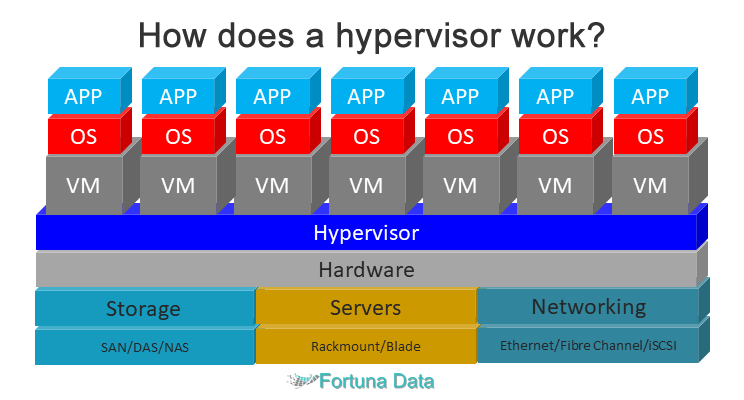
Virtualization is a technology that creates virtual, or simulated, versions of computing resources like servers, storage, and networks from a single physical machine
Virtual Machines
A virtual machine (VM) is the virtualization or emulation of a computer system.
Architecture
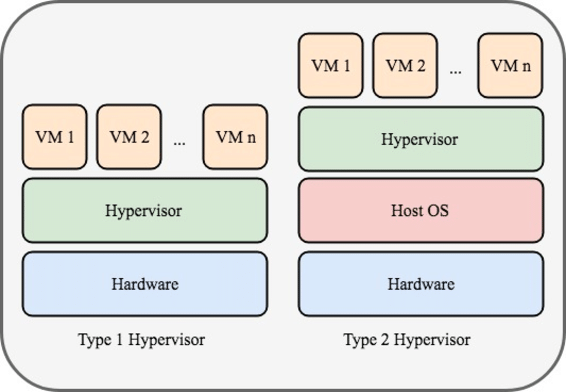
Types of Hypervisors
How to store and send VM’s?
Each hypervisor has it’s own type of disk image format, for example:
- OVA: Virtualbox
- Qcow: Qemu
- VMDK: VMWare
Example
Import a OVA into virtualbox
Characteristics
Good:
- Emulate different architectures and S.O
- Security
- Just ship the image and it “just works”
Bad:
- Size of the image
- Performance
- Interoperability between hypervisors
Can we do it better?
- What if we only want to only package a program? We don’t need an specific version of the kernel.
- Can we say to the kernel: “hey, run this but make it impossible to other programs to communicate with me?”
- Like I am on my own environment…
Containers
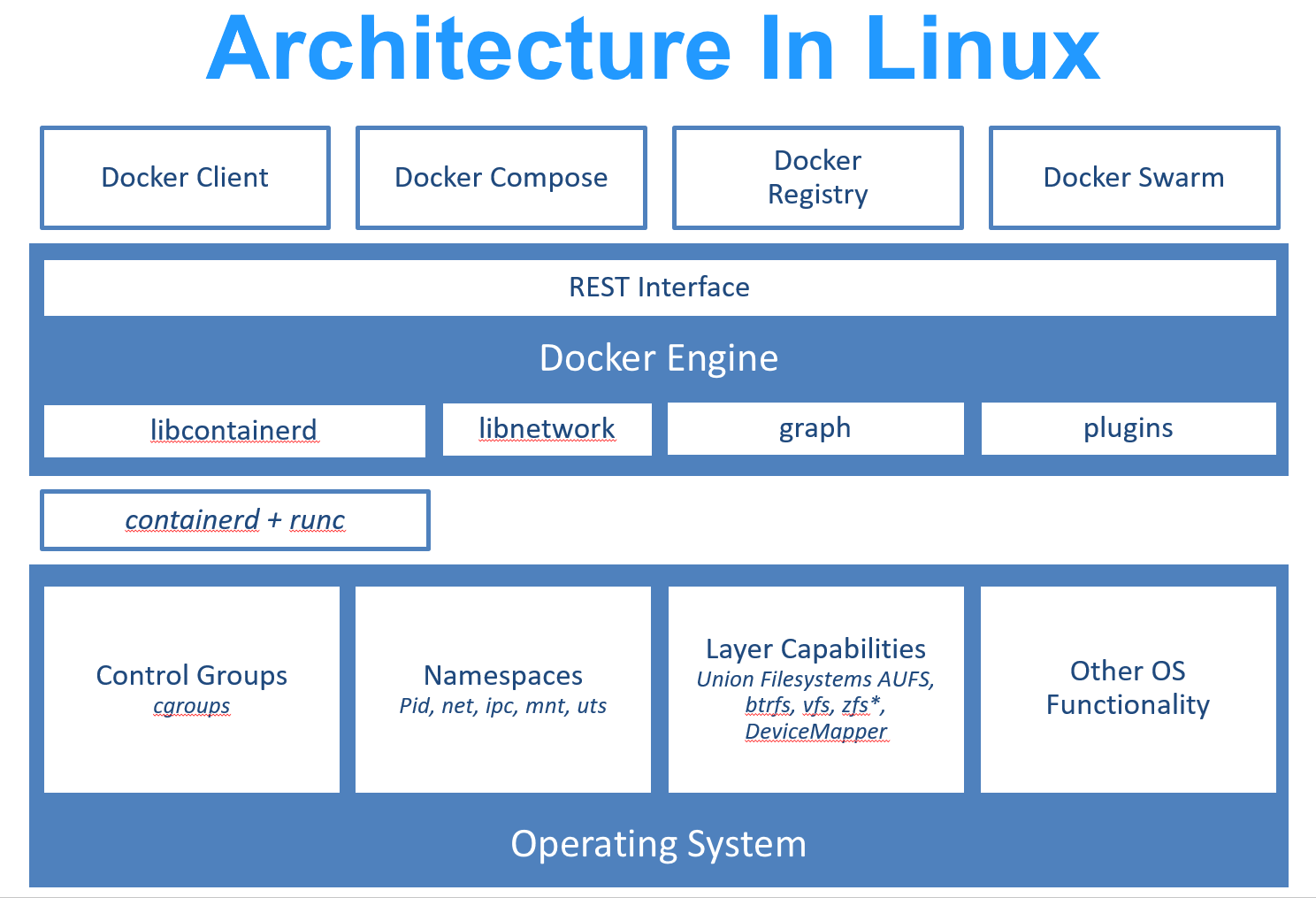
This feature we’re looking for is called containers, and it isn’t named like this on the linux kernel, but it’s a mix of various features of the linux kernel called namespaces , cgroups v2 and overlay filesystems.
Learn More!
LWN.net has some great articles talking about namespaces and cgroups
Architecture
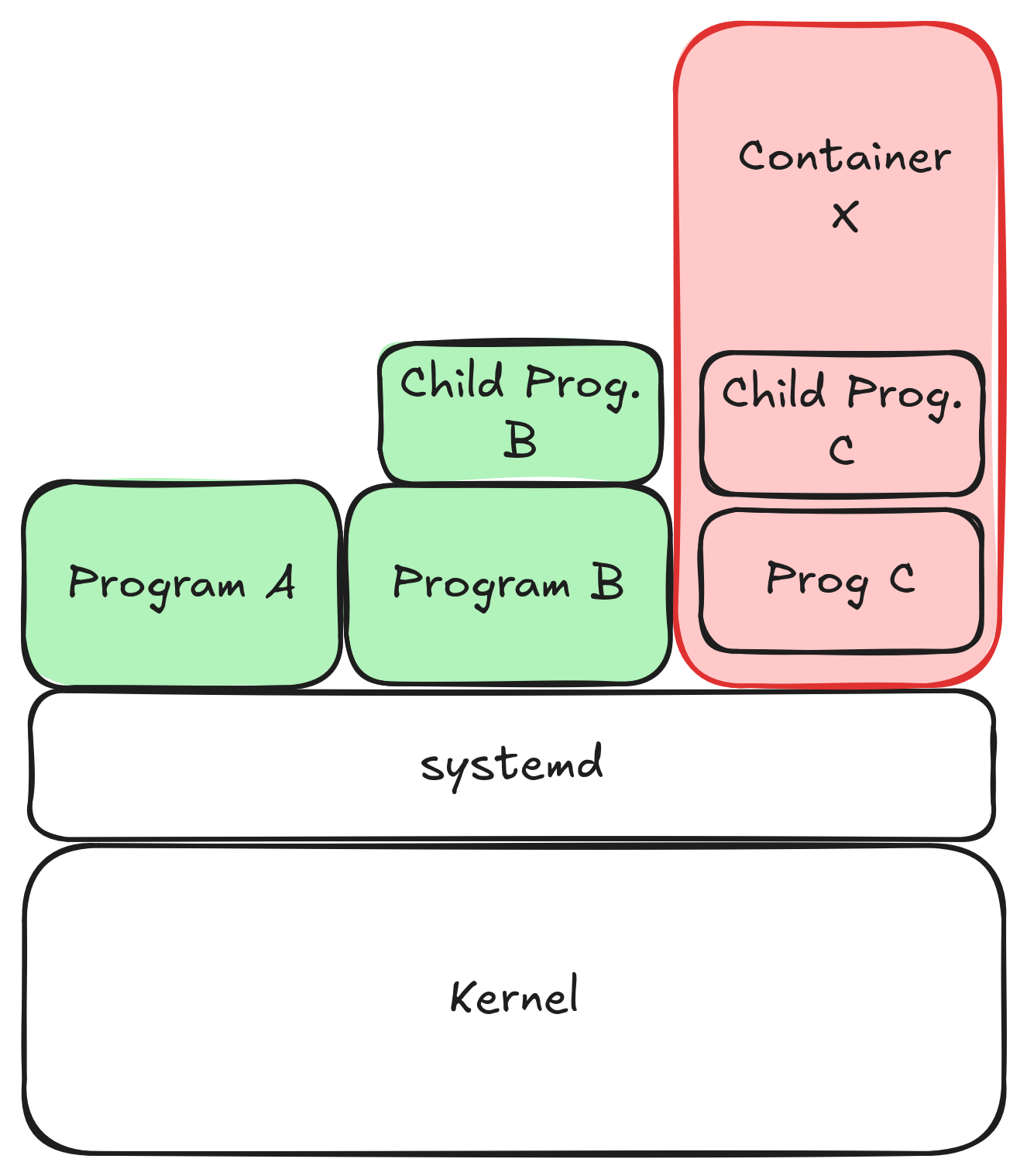
This isn’t true!
It doesn’t really work like this, the real architecture diagram is this one
Steps for starting a container
Step 1: Opcional
Describe the container that I would live to have (A file called Dockerfile), that will be used to create an image.
Step 2: Opcional
From this description, build an image (you can see an image like a .ova on VirtualBox).
Step 3
Create a container given an image with a container engine.
For running it, just the third step is necessary, but you’ll usually do step 1 and step 2 too!
Container Engines
The tools that allow to create, and execute images are called container engines, some examples are:
- Docker
- Podman
- Lxc
- Etc.
Characteristics
Good:
High performance: Runs at near-native speed, just like any other userspace program.
Quick deployment: Starts up instantly, as it launches like a regular userspace application.
Engine interoperability: Can easily work alongside or integrate with different runtime engines.
Bad:
- Linux-only: Depends on kernel features available exclusively in the Linux operating system. The container images can only be linux based too!
- Reduced isolation: Shares the host kernel, which can lead to lower security compared to full virtualization.
VM’s vs containers
If you need full control over the operating system (or want to emulate it), use a virtual machine (VM).
If you need very, very strong isolation and lots of security, use VMs.
If you need faster deployment and execution, use containers.
You’ll probably use containers most of the time (except when doing “strange” work and you want max. security)
Let’s see the results on action
- Compare the execution time of one VM vs one container.
- See each process (container one and hypervisor) running on htop.
Quizz
- How can I run a container engine in windows? And on Mac?
- If I have a macbook m4 (aarch-64), can I run an image build from my machine (x86)??
- If I build an image with one container engine, can I run it on a different one?
References
Really Recommended References:
Additional Exercices
If you really want to understand a little bit more what happens under the hood, you can do the following exercices. Be aware that you should read the “Really Recommended References” first, and then try to do this exercices.
- Create a container that runs a wordpress instance and access it via http://localhost:8080
Discuss exam solution

AMSA 2025-2026 - 🏠 Home